


Bible Chat - Holy Bible Study
4.92.48K Reviews
App Specs
- Version
- 5.0.27
- Updated On
- License
- Free
- Downloads
- 5,000,000+
- Developer
- Book Vitals Inc.
- Categories
- Books & Reference
- Platform
- Android, iOS
Screenshots
 Analysis by AppCompare
I’d approach Bible Chat: Holy Bible Study as a starting point for a small, regular Bible-reading habit rather than as a replacement for a printed Bible, a church community, or careful study. Its appeal is the conversational way into scripture: when I’m unsure what to read or what a passage might mean, a question-led app can feel less intimidating than opening a large reference book and hoping I find the right page. The most useful first goal is modest: read a verse, consider one question, and leave with a thought worth carrying into the day.
Getting Started with Bible Chat
First off, downloading and setting up Bible Chat: Holy Bible Study was a breeze. Available on both Android and iOS, it’s as easy as tapping a button to get started. Once installed, the app welcomes you with a clean interface that’s both inviting and user-friendly. No need to be a tech whiz to navigate around.
What to Expect from a Bible Chat App
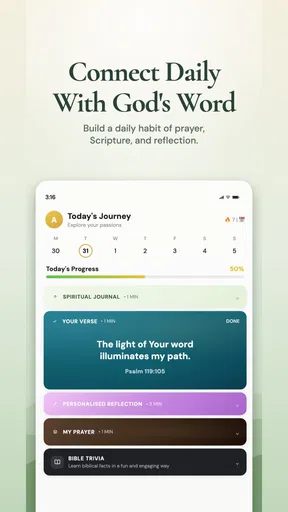
This is a Books & Reference app from Bookvitals, built around Bible-related reading, reflection, and prayer rather than general-purpose messaging. Its store summary points to a verse of the day, encouraging verses, devotionals, and an audio Bible prayer experience. That mix makes it suited to short moments of reflection as well as a longer study session, but I would not treat a conversational answer as the final word on a difficult theological question. It is better used to prompt reading and thought than to settle disagreements about interpretation.
The app is free to install and is rated for Everyone. It has a 4.9 average from around 77,000 ratings, with more than a million installs, which suggests that many people have found it useful. There are in-app purchases, priced from $0.99 to $69.99 per item, so I’d pay attention to any purchase screen and decide what, if anything, is worth paying for before committing. The current version is 3.4.0.1, and it requires Android 8.0 or later on Android devices.
Make the First Session Small and Specific
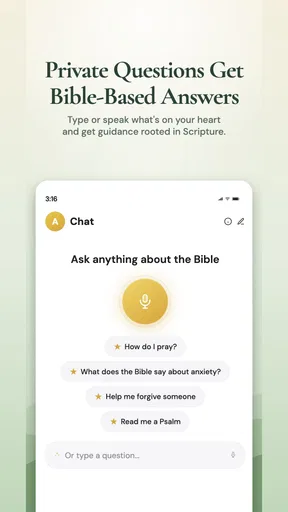
The app is packed with features designed to make your Bible study sessions more engaging and insightful. One of the standout features is the chat function. Imagine being able to ask questions and get answers in real-time—pretty cool, right? It’s like having a Bible study buddy in your pocket!
For a first session, I’d keep the question concrete instead of asking something enormous like “What does the Bible say about life?” A focused prompt about a verse, a theme, or a situation you’re reflecting on gives you a clearer place to begin. Then read the passage itself and decide whether the response helps you notice something you had missed. That simple check matters: it keeps the chat in the role of a guide, not an authority standing in for the text.
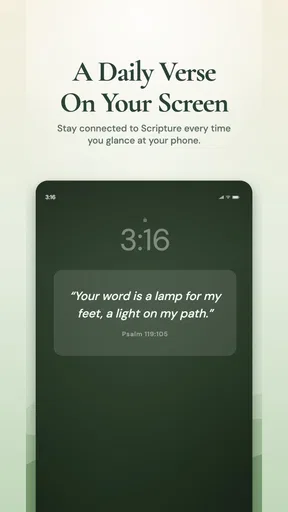
Another neat feature is the daily verse notifications. If you’re someone who needs a little reminder to stay on track, these notifications are a godsend. They pop up at your preferred time, offering a dose of inspiration just when you need it.
Worth Reading Before You Choose

Flipboard Shows What News Apps Must Do Beyond the Feed

Switching to Android Auto Means Rethinking Your Driving Routine

Google Calendar Makes a Crowded Week Easier to Manage

Ludo King Makes the Most of the Minutes Between Plans

Baby Panda World Brings Quick Play to Modern Phones, but Its Game Library Feels Busy

ESPN’s Live Game View Makes Following Close Games Easier
Fit Reflection into an Ordinary Day
A realistic way to use the app is to choose a quiet point in a routine you already have: perhaps after breakfast, during a lunch break, or before bed. If a verse notification arrives when you are busy, there’s no need to turn it into homework; return to it when you can give it attention. I’d read the verse, pause over a word or idea that stands out, and use the chat to explore one question. That makes the experience feel personal without demanding a long, uninterrupted study block.
The reminder can also work as a gentle cue for someone who wants consistency but tends to forget. On the other hand, people who dislike phone alerts may find notifications distracting rather than encouraging. If that sounds like you, treat the app as something to open intentionally instead of expecting a reminder to create the habit on its own. The value comes from returning to the reading, not from receiving a prompt.
Use Audio and Devotional Moments Deliberately
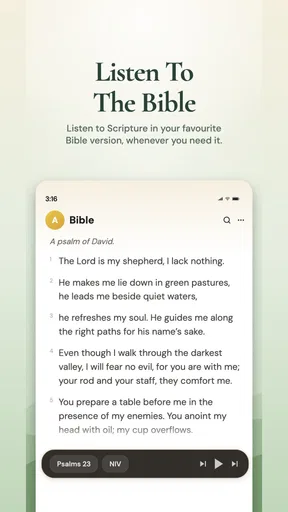
The audio Bible prayer element is a useful option for moments when reading on a screen is inconvenient or when you want a quieter, more reflective start to the day. I’d use listening as a change of pace, not assume it replaces close reading: hearing words can make a passage easier to absorb, while looking at the text gives you room to stop and examine a phrase. Switching between those modes can keep a brief routine from feeling repetitive.
Devotional material can help when you want a structured thought to begin with, especially if you are new to regular Bible reading and do not yet know how to choose a passage. A practical approach is to take one idea from a devotional and then return to the related scripture yourself. That small extra step helps separate reflection from interpretation and gives you a better sense of whether the supporting passage fits the point being made.
Features Worth Exploring
The app is packed with features designed to make your Bible study sessions more engaging and insightful. One of the standout features is the chat function. Imagine being able to ask questions and get answers in real-time—pretty cool, right? It’s like having a Bible study buddy in your pocket!
Another neat feature is the daily verse notifications. If you’re someone who needs a little reminder to stay on track, these notifications are a godsend. They pop up at your preferred time, offering a dose of inspiration just when you need it.
Use Chat as a Prompt, Not a Substitute
For a more useful exchange, I’d ask follow-up questions that make the answer easier to assess: which passage is relevant, what the surrounding context contributes, and whether there are other reasonable ways to read it. This is a good habit with any AI-style Bible conversation, since a fluent response can sound more certain than its reasoning deserves. When a topic matters deeply to you, compare the answer with the scripture itself and, if appropriate, ask a trusted pastor or study group member.
That distinction is especially important for personal decisions. The app may help you reflect on a concern or identify a passage to read, but I would not treat a chat response as a command about relationships, health, money, or another serious matter. Use it to generate questions for reflection, then bring real-world judgment and trusted human support into the decision.
Diving Deeper
For those who love to dive deeper, the app offers detailed commentaries and study guides. Whether you're exploring the Old Testament or the New, you'll find resources to help you understand the context and meaning behind the scriptures. Plus, the discussion forums are a fantastic way to connect with other users and share insights.
One feature I found particularly helpful is the notes and bookmarking capability. You can jot down thoughts, highlight passages, and easily return to them later. This makes it simple to revisit your favorite verses or prepare for group studies.
Turn Saved Notes into a Study Trail
Notes and bookmarks are most useful when they capture more than a verse reference. I’d add a brief note about why I saved a passage or what question I still have, then return to it later with fresh eyes. Over time, that creates a personal trail through the material: not a polished study journal, but a record of what caught my attention and what I want to understand better.
For group preparation, I’d save a passage and write one open question rather than trying to settle the discussion in advance. That gives the group something concrete to explore and makes it easier to distinguish what the text says from what each person brings to it. If you already keep detailed notes in a notebook or another app, though, duplicating everything here may add friction; use the built-in tools only if they make returning to scripture easier.
How It Compares with Other Ways to Study
Compared with opening a conventional Bible app, the conversational approach is more inviting when you have a question but no study plan. A standard Bible reader is usually the better fit when your priority is reading a particular translation, moving through a book in order, or comparing passages without conversational prompts. A printed Bible is often preferable when you want fewer screen distractions, while a commentary or a guided group study can offer a more deliberate method for complex subjects.
I see this app’s strength as lowering the effort needed to begin: a verse, a devotional thought, or a question can get a session moving. Its trade-off is that quick answers can encourage quick conclusions. For careful study, I’d use it alongside the source passage and a trusted reference rather than asking it to do all the interpretive work. If you already have a reading plan you enjoy and mainly need a clean text reader, a simpler Bible app may suit you better.
Common Confusion Before You Settle In
One likely point of confusion is whether the chat itself is the Bible. It isn’t; the conversation is a way to approach questions, while the scripture remains the material I’d return to and read in context. Another is whether every feature needs to be used in every session. It doesn’t. A verse and a short reflection can be enough on a busy day, while audio, devotional content, or saved notes can support a longer session when you want more structure.
It is also worth distinguishing the free download from optional in-app purchases. You can begin without making a purchase, but if a prompt to buy appears, pause and check what is being offered and whether you actually need it. Someone who only wants occasional verses may have little reason to pay, while a reader who uses the app regularly may decide that an optional item is worthwhile. I would make that choice based on my own routine, not because a screen makes an upgrade feel necessary.
Who Will Get the Most from It
I’d recommend it to someone who wants a low-pressure way to start reading, enjoys asking questions as they go, or appreciates having devotional and prayer-oriented material in one place. It may also suit a person who has tried to build a habit with a plain reading app but finds an open-ended text hard to approach. The conversational entry point gives that reader a practical next move: ask, read, reflect, and save a note if the idea seems worth revisiting.
I’d be more cautious if you want a scholarly research tool, a distraction-free reading experience, or authoritative answers to sensitive spiritual questions. It is also not the best choice for someone who strongly prefers paper or does not want a phone involved in devotional time. In those cases, a printed Bible, a dedicated text-focused reader, or a conversation with a knowledgeable person may serve you better. That is not a knock on this app; it is simply a matter of choosing the right tool for the kind of study you want.
My Personal Take
So, what’s the verdict? I genuinely enjoyed using this app. It makes Bible study accessible and interactive, which is a win in my book. The real-time chat feature is a game-changer, and the wealth of resources available means there’s always something new to learn. Whether you’re a seasoned scholar or just starting your spiritual journey, this app has something to offer.
My one qualification is that I would keep the experience grounded in the text. The chat can help me get past the blank-page feeling and notice questions I might not have asked on my own, but a confident answer is still something to think through. When I have only a few minutes, the verse and a short reflection are enough; when I have longer, I can follow a question into the passage and make a note for later. That flexibility is what makes the app practical for everyday use.
In conclusion, if you’re looking to enrich your understanding of the Bible while keeping things fresh and engaging, give Bible Chat: Holy Bible Study a try. It’s more than just an app—it’s a companion on your spiritual path.
A Simple Next Step
For a first meaningful session, I’d start with one topic that is already on my mind, ask a narrow question, and read the passage connected to the response rather than stopping at the chat. I’d save one useful thought or an unanswered question, then decide whether the daily verse, devotional material, or audio prayer is the part I’m most likely to return to. That keeps the first visit manageable and helps me judge the app by whether it supports a routine I genuinely want.
Pros
- Offers a wide range of Bible translations.
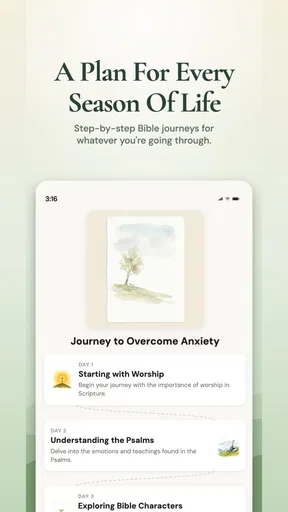
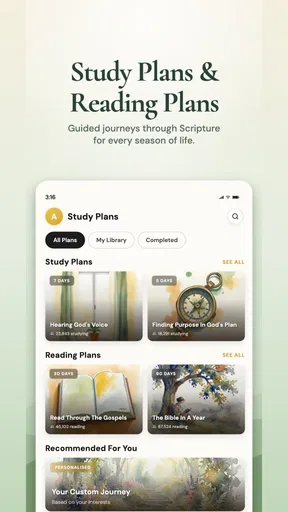
- Includes daily devotionals and study plans.
- Interactive chat feature for community discussions.
- Audio Bible available for hands-free study.
- User-friendly interface with easy navigation.
Cons
- In-app purchases for premium content.
- Requires internet for some features.
- Ads can be disruptive during use.
- Limited offline functionality.
- May have occasional login issues.
FAQs for Bible Chat - Holy Bible Study
What features does Bible Chat: Holy Bible Study offer?
Bible Chat: Holy Bible Study offers a range of features including daily devotionals, scripture reading plans, and interactive chat rooms for discussions. Users can highlight verses, take notes, and share insights with others. The app also includes audio versions of the Bible for those who prefer listening.
Is Bible Chat: Holy Bible Study free to use?
Yes, Bible Chat: Holy Bible Study offers a free version with basic features. However, there is a premium subscription available that unlocks additional content such as exclusive devotionals, ad-free usage, and advanced search functionalities. Users can choose the plan that best suits their needs.
Can I use Bible Chat: Holy Bible Study offline?
The app requires an internet connection for features like chat rooms and downloading new content. However, once you've downloaded specific Bible versions or study materials, you can access them offline. This makes it convenient for users who want to study the Bible on-the-go without constant internet access.
How secure is my data on Bible Chat: Holy Bible Study?
Bible Chat: Holy Bible Study prioritizes user privacy and data security. The app uses encryption to protect personal information and does not share data with third parties without consent. Users can control their privacy settings and manage what information they wish to share within the app's community features.
Is Bible Chat: Holy Bible Study suitable for group studies?
Yes, the app is designed to facilitate both individual and group Bible studies. Users can create or join group chat rooms to discuss scripture and share insights. The app also supports collaborative study plans, making it easy to coordinate with friends, family, or church groups.


